

Deserialize a JSON in Different ways
October 8, 2023
JSON(JavaScript Object Notation):
- A text-based standard for encoding structured data based on JavaScript object syntax.
- It is frequently used in online applications to transport data (such as passing data from the server to the client so it may be displayed on a web page, or vice versa).
- It contains data in form of Key-Value pair.
example of a JSON object:
{
  "firstName": "SFDC",
  "lastName": "Elements"
}
example of JSON array:
[
  {
    "firstName": "SFDC",
    "lastName": "Elements"
  },
  {
    "firstName": "Welcome",
    "lastName": "To"
  },
  {
    "firstName": "My",
    "lastName": "Blog"
  }
]
1- Deserialize a JSON with & without Wrapper Class:
{
  "firstName": "SFDC",
  "lastName": "Elements"
}
public class JSONExampleClass {
    //With wrapper class
    public static void deseriliazeJsonWithWrapper(){
        String jsonObj='{"firstName":"SFDC", "lastName":"Elements"}';
        JSONWrapper empData=(JSONWrapper)JSON.deserialize(jsonObj, JSONWrapper.class);
        /*If you wont type cast with your wrapper class then it will throw error of
        Illegal assignment from Object to JSONExampleClass.JSONWrapper*/
        System.debug('check firstName::'+empData.firstName);
        System.debug('check lastName::'+empData.lastName);
    }

    public class JSONWrapper{
        public String firstName;
        public String lastName;
    }

    //Without Wrapper class
    public static void deseriliazeJsonWithoutWrapper(){
        String jsonObj='{"firstName":"SFDC", "lastName":"Elements"}';
        //if there is a JSON object then untyped return as Map<String,Object>
        Map<String,Object> empMap=(Map<String,Object>)JSON.deserializeUntyped(jsonObj);
        /*If you wont type cast with your wrapper class then it will throw error of
        Illegal assignment from Object to Map<String,Object>*/
        for(String key:empMap.keySet()){
            String jsonKey=key;
            String JsonValue=String.valueOf(empMap.get(key));
            System.debug(jsonKey+'::'+JsonValue);
        }

        System.debug('value when you know the key::'+String.valueOf(empMap.get('firstName'))+' '+String.valueOf(empMap.get('lastName')));
    }
}
Output:
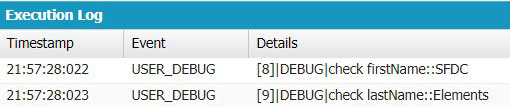
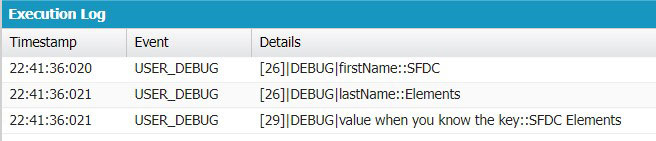
2- Deserialize a JSON Array with & without Wrapper Class:
[
  {
    "firstName": "SFDC",
    "lastName": "Elements"
  },
  {
    "firstName": "Welcome",
    "lastName": "To"
  },
  {
    "firstName": "My",
    "lastName": "Blog"
  }
]
public class JSONArrayExampleClass {
    public static void deseriliazeJsonArrayWithWrapper(){
        String jsonData='[{"firstName":"SFDC","lastName":"Elements"},{"firstName":"Welcome","lastName":"To"},{"firstName":"My","lastName":"Blog"}]';
        //With wrapper class
        List<JSONWrapper> empData=(List<JSONWrapper>)JSON.deserialize(jsonData, List<JSONWrapper>.class);
        /*If you wont type cast with your list<wrapper class> then it will throw error of
        Illegal assignment from Object to List<JSONArrayExampleClass.JSONWrapper>*/
        for(JSONWrapper jwrap:empData){
            System.debug('check firstName::'+jwrap.firstName);
        	System.debug('check lastName::'+jwrap.lastName);
        }
    }

    public class JSONWrapper{
        public String firstName;
        public String lastName;
    }

    //without wrapper class
    public static void deseriliazeJsonArrayWithoutWrapper(){
        String jsonData='[{"firstName":"SFDC","lastName":"Elements"},{"firstName":"Welcome","lastName":"To"},{"firstName":"My","lastName":"Blog"}]';
        //if there is a JSON Array then untyped return as List<Object>
        List<Object> empData=(List<Object>)JSON.deserializeUntyped(jsonData);
        /*If you wont type cast with your list<wrapper class> then it will throw error of
        Illegal assignment from Object to List<Object>*/
        for(Object empObj:empData){
            //now each empObj is a JSON object so we need to convert it in Map<String,Object>
            Map<String,Object> empMap=(Map<String,Object>)empObj;
            for(String key:empMap.keySet()){
                String jsonKey=key;
                String JsonValue=String.valueOf(empMap.get(key));
                System.debug(jsonKey+'::'+JsonValue);
            }
            System.debug('value when you know the key::'+String.valueOf(empMap.get('firstName'))+' '+String.valueOf(empMap.get('lastName')));
        }
    }
}
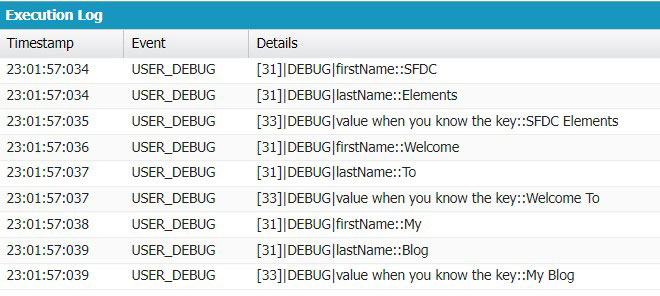
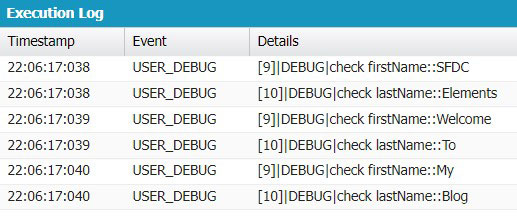
3- Deserialize a Nested JSON with & without Wrapper Class:
{
  "firstName": "John",
  "lastName": "Smith",
  "gender": "male",
  "age": 32,
  "address": {
    "streetAddress": "21 2nd Street",
    "city": "New York",
    "state": "NY",
    "postalCode": "10021"
  },
  "phoneNumbers": [
    {
      "type": "home",
      "number": "212 555-1234"
    },
    {
      "type": "fax",
      "number": "646 555-4567"
    }
  ]
}
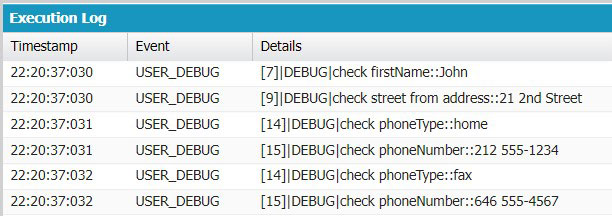
public class NestedJSONExample {
    public static void deserilizeNestedJSONwithWrapper(){
        String jsonString='{"firstName":"John","lastName":"Smith","gender":"male","age":32,"address":{"streetAddress":"21 2nd Street","city":"New York","state":"NY","postalCode":"10021"},"phoneNumbers":[{"phoneType":"home","phoneNumber":"212 555-1234"},{"phoneType":"fax","phoneNumber":"646 555-4567"}]}';

        MainWrapper mainWrap=(MainWrapper) JSON.deserialize(jsonString,MainWrapper.class);

        System.debug('check firstName::'+mainWrap.firstName);
        //similarily for lastName,gender and age

        System.debug('check street from address::'+mainWrap.address.streetAddress);
        //similarily for city,state and postalCode mainWrap.address.city,mainWrap.address.state,mainWrap.address.postalCode

        //loop to get all the phoneNumbers as this is an array
        for(PhoneWrapper phoneWrap: mainWrap.phoneNumbers){
            System.debug('check phoneType::'+phoneWrap.phoneType);
            System.debug('check phoneNumber::'+phoneWrap.phoneNumber);
        }
    }

    public class MainWrapper{
        public String firstName;
        public String lastName;
        public String gender;
        public Integer age;
        public AddressWrapper address; //as address is a JSON object here so taking as object of AddressWrapper
        public List<PhoneWrapper> phoneNumbers; //as phoneNumbers is JSON Array so taking as List<PhoneWrapper>
    }

    public class AddressWrapper{
        public String streetAddress;
        public String city;
        public String state;
        public String postalCode;
    }

    public class PhoneWrapper{
        public String phoneType;
        public String phoneNumber;
    }


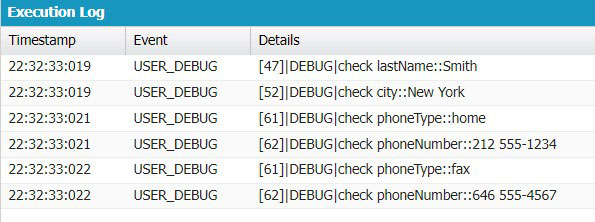
    public static void deserilizeNestedJSONwithoutWrapper(){
        String jsonString='{"firstName":"John","lastName":"Smith","gender":"male","age":32,"address":{"streetAddress":"21 2nd Street","city":"New York","state":"NY","postalCode":"10021"},"phoneNumbers":[{"phoneType":"home","phoneNumber":"212 555-1234"},{"phoneType":"fax","phoneNumber":"646 555-4567"}]}';

        Map<String,Object> jsonMap=(Map<String,Object>) JSON.deserializeUntyped(jsonString);

        System.debug('check lastName::'+jsonMap.get('lastName'));
        //similarily for firstName,gender and age

        Map<String,Object> addressMap=(Map<String,Object>)jsonMap.get('address');
        String city=String.valueOf(addressMap.get('city'));
        System.debug('check city::'+city);
        //similarily for streetAddress,state and postalCode

        //loop to get all the phoneNumbers as this is an array
        List<Object> phoneList=(List<Object>)jsonMap.get('phoneNumbers');
        for(Object phoneObj: phoneList){
            Map<String,Object> phoneMap=(Map<String,Object>)phoneObj;
            String phoneType=String.valueOf(phoneMap.get('phoneType'));
            String phoneNumber=String.valueOf(phoneMap.get('phoneNumber'));
            System.debug('check phoneType::'+phoneType);
        	System.debug('check phoneNumber::'+phoneNumber);
        }
    }
}


Our Visitor
0
0
2
0
9
3
 Users Today : 0
 Users Yesterday : 0
 Users Last 7 days : 13
 Users Last 30 days : 57
 Users This Month : 17
 Users This Year : 1180
 Total Users : 2093
 Views Today :
  Views Yesterday :
  Views Last 7 days : 30
 Views Last 30 days : 99
 Views This Month : 35
 Views This Year : 3247
 Total views : 4834
 Who's Online : 0 Your IP Address : 216.73.216.198 Server Time : September 14, 2026 8:04 pm
Powered By WPS Visitor Counter
Cool
Thanks