

Integrating Salesforce with Azure SharePoint: Upload Files Seamlessly via API
August 20, 2025
Use Case: Upload any file from a records attachment to Azure SharePoint

Setup: Create Remote Site Setting for these url
url: https://login.microsoftonline.com/
https://graph.microsoft.com/
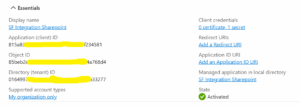
1- Register an app in Azure Portal to generate the following keys:
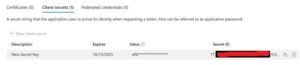
2- Client secret value by clicking on client credentials:
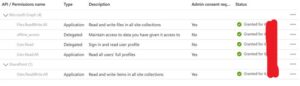
3- Permissions required to upload file:
1- Generating Access Token
public class AzureAPIService {
    public static string client_id='815a83xxxxxxxxxxxxxxf234581';
    public static string client_secret='dNl8xxxxxxxxxxxxxxxxj9cdpd';
    public static string tenant_id='016499xxxxxxxxxxxxxxx9b33277';
    public static string grant_type='client_credentials';
    public static string scope='https://graph.microsoft.com/.default';

/*---------------------
Get Access Token
---------------------*/
    public static void callAzureAPI(String contentDocId){
        String tokenurl='https://login.microsoftonline.com/'+tenant_id+'/oauth2/v2.0/token';

        try {
            HttpRequest req = new HttpRequest();
            req.setEndpoint(tokenurl);
            req.setHeader('content-type','application/x-www-form-urlencoded');
            req.setMethod('POST');
            String body = 'client_id=' + EncodingUtil.urlEncode(client_id, 'UTF-8') +
                '&scope=' + EncodingUtil.urlEncode(scope, 'UTF-8') +
                '&client_secret=' + EncodingUtil.urlEncode(client_secret, 'UTF-8') +
                '&grant_type='+EncodingUtil.urlEncode(grant_type, 'UTF-8');
            req.setHeader('Content-length', String.valueOf(body.length()));
            req.setBody(body);

            Http http = new Http();
            HttpResponse res = http.send(req);

            if (res.getStatusCode() == 200) {
                String responseBody = res.getBody();
                Map<String,Object> resMap=(Map<String,Object>)JSON.deserializeUntyped(responseBody);
                String accessToken=String.valueOf(resMap.get('access_token'));
                System.debug('accessToken::::: ' + accessToken);
                System.debug('Response: ' + responseBody);
            } else {
                System.debug('Error: ' + res.getStatus());
            }
        } catch (Exception e) {
            System.debug('Exception: ' + e.getMessage());
        }
    }
}
Response:
{
  "token_type": "Bearer",
  "expires_in": 3599,
  "ext_expires_in": 3599,
  "access_token": "eyJ0eXAiOiJxxxxxxxxxxxxxxxxxxxxxxxxxxxxxxxQS_GZCw-hMrW7wHZiKEE3we01VA"
}
2- Getting userId by passing email id of the user and access token.
/*-----------------------------------
Get User Id API
-----------------------------------*/
    public static String getUserId(String email, String accessToken) {
        HttpRequest req = new HttpRequest();
        req.setEndpoint('https://graph.microsoft.com/v1.0/users/' + EncodingUtil.urlEncode(email, 'UTF-8'));
        req.setMethod('GET');
        req.setHeader('Authorization', 'Bearer ' + accessToken);
        req.setHeader('Accept', 'application/json');

        Http http = new Http();
        HttpResponse res = http.send(req);

        if (res.getStatusCode() == 200) {
            Map<String, Object> data = (Map<String, Object>) JSON.deserializeUntyped(res.getBody());
            System.debug('User id::'+data);
            return (String) data.get('id');
        } else {
            System.debug('Failed to get userid::' + res.getBody());
            return null;
        }
    }
Response:
{
  @odata.context=https: //graph.microsoft.com/v1.0/$metadata#users/$entity,
  businessPhones=(),
  displayName=TestingAzure,
  givenName=Test,
  id=1ab76e2xxx-xxxxx-xxxxx6980eff869,
  jobTitle=null,
  mail=testing12345@example.com,
  mobilePhone=null,
  officeLocation=null,
  preferredLanguage=null,
  ...
}
3- access token, user id, file name and file(as blob) are required to upload the file
/*----------------
upload file
------------------*/
    public static void uploadFileToOneDrive(String accessToken, String fileName, Blob fileData) {
        HttpRequest req = new HttpRequest();
        String userid='1ab76exxx-xxxx-xxxxx-xx80eff869';
        String endpoint='https://graph.microsoft.com/v1.0/users/' + userid + '/drive/root:/' + EncodingUtil.urlEncode(fileName+'.jpg', 'UTF-8') + ':/content';
        req.setEndpoint(endpoint);
        req.setMethod('PUT');
        req.setHeader('Authorization', 'Bearer ' + accessToken);
        req.setHeader('Content-Type', 'image/jpg');
        req.setBodyAsBlob(fileData);

        Http http = new Http();
        HttpResponse res = http.send(req);

        if (res.getStatusCode() == 201 || res.getStatusCode() == 200) {
            System.debug('File uploaded successfully: ' + res.getBody());
        } else {
            System.debug(' Upload failed: ' + res.getStatusCode() + ' - ' + res.getBody());
        }
    }
Response:
{
  "@odata.context": "https://graph.microsoft.com/v1.0/$metadata#users('1ab76xx-xxxx-xxxxx-xxxx-xx0eff869')/drive/root/$entity",
  "@microsoft.graph.downloadUrl": "https://test-my.sharepoint.com/personal/test_azure_onmicrosoft_com/_layouts/15/download.aspx?UniqueId=XXXXXXXXXXX&ApiVersion=2.0",
  "createdDateTime": "2025-08-19T12:51:35Z",
  "eTag": "\"{E0933B1E-1C97-4A79-B31B-91EC09DF652C},1\"",
  "id": "01D7XXXXXXXXXXXXXXXXX6ZJM",
  "lastModifiedDateTime": "2025-07-22T12:51:35Z",
  "name": "QR+Code+for+Test+Account+19th+Aug.jpg",
  "webUrl": "https://test-my.sharepoint.com/personal/test_azure_onmicrosoft_com/Documents/QR+Code+for+Test+Account+19th+Aug.jpg",
  "cTag": "\"c:{E093XXX-XXXX-XXXXXXXX-XX652C},1\"",
  "size": 3076,
  "createdBy": {
    "application": {
      "id": "815a8xx-xxxx-xxxxx-xxx4581",
      "displayName": "SF Integration Sharepoint"
    },
    "user": {
      "displayName": "SharePoint App"
    }
  },
  "lastModifiedBy": {
    "application": {
      "id": "815a8xxxx-xxx-xxxx-xx87f234581",
      "displayName": "SF Integration Sharepoint"
    },
    "user": {
      "displayName": "SharePoint App"
    }
  },
  "parentReference": {
    "driveType": "business",
    "driveId": "b!rIwJ5xxxxxxxxxxxxxxxxTpwP-8V_i3Yl",
    "id": "01D7P4DXXXXXXXXXXXXX4PWSELRRZ",
    "name": "Documents",
    "path": "/drive/root:",
    "siteId": "e509xxx-xxxx-xxxx-xxx-e778744"
  },
  "file": {
    "mimeType": "image/jpeg",
    "hashes": {
      "quickXorHash": "HfFojODsLCS0Y2k/bfnl9Cl0xsc="
    }
  },
  "fileSystemInfo": {
    "createdDateTime": "2025-08-19T12:51:35Z",
    "lastModifiedDateTime": "2025-08-19T12:51:35Z"
  },
  "image": {

  },
  "photo": {

  }
}
Output:



Our Visitor
0
0
2
0
9
3
 Users Today : 0
 Users Yesterday : 0
 Users Last 7 days : 13
 Users Last 30 days : 57
 Users This Month : 17
 Users This Year : 1180
 Total Users : 2093
 Views Today :
  Views Yesterday :
  Views Last 7 days : 30
 Views Last 30 days : 99
 Views This Month : 35
 Views This Year : 3247
 Total views : 4834
 Who's Online : 0 Your IP Address : 216.73.216.198 Server Time : September 14, 2026 8:05 pm
Powered By WPS Visitor Counter
Very Helpful…
Thanks Sandip!